
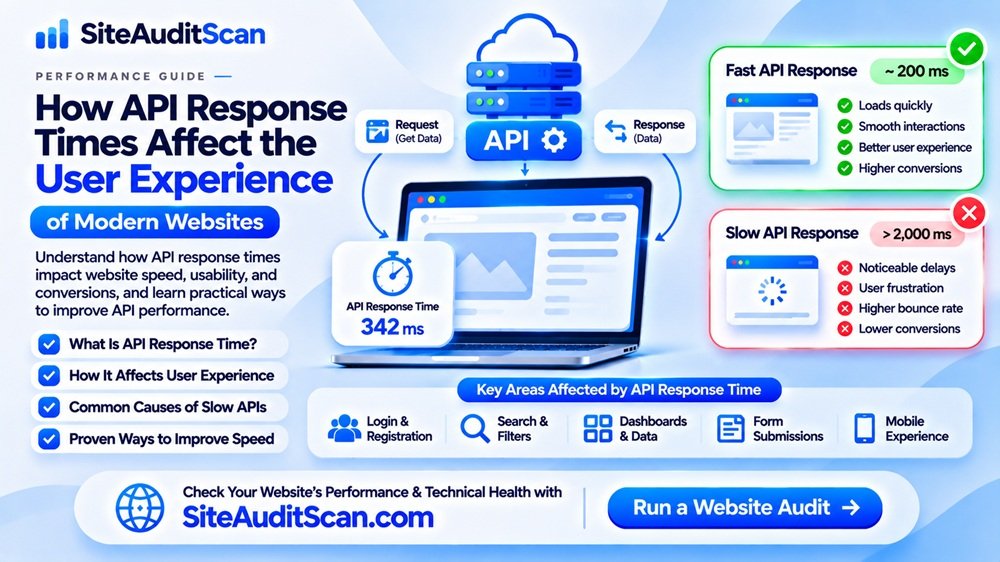
Have you ever opened a website, clicked a button, and waited several seconds for something to happen? Perhaps a product list takes too long to load, a login button keeps spinning, or a dashboard displays empty sections before finally showing the information.
In many cases, the problem is not the website’s design. It may be related to how quickly the website communicates with its backend through APIs.
Modern websites depend heavily on APIs to exchange information between the frontend and backend. Whenever a user logs in, searches for a product, submits a form, checks an order, or loads dynamic content, one or more API requests may be involved.
When these requests take too long to complete, the entire experience can feel slow, even when the website looks visually attractive.
Understanding API response times is therefore important for developers, business owners, and anyone responsible for website performance.
In this guide, we will explain what API response time means, how it affects user experience, what causes slow API responses, and which practical techniques can help improve API performance.
If you are reviewing your website’s technical health, you can also explore the available website audit checks at SiteAuditScan.
What Is API Response Time?
API response time is the time taken for an API request to receive a response from the server.
In a typical website application, the frontend sends a request to an API endpoint. The backend processes the request, retrieves or updates information, and sends a response back to the frontend.
For example, imagine a user opening an online shopping website.
The frontend may request:
- Product details.
- Product images and prices.
- Available stock.
- Customer reviews.
- Recommended products.
Each request may involve communication with a backend service or database.
API response time measures how long a request takes to receive its response. The exact measurement depends on where timing starts and ends. It is important to distinguish server processing time from the full time experienced by the browser, which can also include network delays, browser processing, and rendering.
A simple example:
A user clicks the “View Products” button.
- The frontend sends an API request.
- The backend receives the request.
- The server processes the request.
- The database returns the required product information.
- The API sends a response.
- The frontend displays the products.
If the API takes too long to respond, the user may see a loading indicator or an empty section for longer than expected.
Why API Response Time Matters for User Experience
Website performance is not only about how quickly the homepage appears. Users also expect actions and interactions to respond without unnecessary delays.
A website may load its initial layout quickly but still feel slow when users interact with it.
Here are some common situations where API performance directly affects the user experience.
1. Slow Login and Registration Processes
Login and registration are among the most important interactions on many websites.
When a user enters their credentials, the frontend sends a request to the authentication API. The backend validates the information and returns a response indicating whether the login was successful.
If the API takes too long, users may experience:
- A login button that keeps loading.
- Delays before reaching the dashboard.
- Repeated clicks because the user thinks nothing happened.
- Confusion about whether the credentials were accepted.
- Abandoned registration processes.
For example, a coaching institute platform may allow students to register, log in, view courses, and manage their profiles.
If the authentication API is slow, students may assume the entire platform is unreliable.
What developers can do:
- Review authentication endpoint performance.
- Avoid unnecessary database queries during login.
- Optimise password verification without weakening security.
- Check external authentication service delays.
- Prevent duplicate login requests while a request is already processing.
2. Slow Product Search and Filtering
Search functionality is another area where API performance makes a noticeable difference.
Imagine visiting an ecommerce website and searching for a laptop. You expect relevant results to appear quickly.
The frontend sends the search term to an API, which processes the query and returns matching products.
If the search API is slow, users may experience delayed results, loading animations, or filters that take too long to update.
This becomes more frustrating when users apply multiple filters, such as:
- Product category.
- Price range.
- Brand.
- Rating.
- Availability.
- Location.
What developers can do:
- Optimise database search queries.
- Add appropriate database indexes.
- Avoid returning unnecessary product fields.
- Implement pagination.
- Use caching for frequently requested data.
- Consider debouncing search input to avoid sending a request for every keystroke.
A responsive search experience helps users find information without unnecessary waiting.
3. Slow Dashboard Loading
Modern dashboards often depend on multiple API endpoints.
For example, an admin dashboard may request:
- Total registered users.
- Monthly revenue.
- Recent transactions.
- Pending enquiries.
- Activity reports.
- Notifications.
If these endpoints respond slowly, the dashboard may take a long time to become fully usable.
In some applications, a single slow API request can delay the display of an entire dashboard section.
What developers can do:
- Load independent dashboard sections in parallel when appropriate.
- Avoid making unnecessary sequential API requests.
- Cache suitable summary data.
- Use pagination for large datasets.
- Load less important dashboard sections progressively.
- Review expensive database queries.
Instead of making users wait for every dashboard component, developers can prioritise the information needed first.
4. Slow Form Submissions
Contact forms, registration forms, booking forms, and enquiry forms often depend on APIs.
When a user submits a form, the frontend sends the information to the backend for validation and processing.
The API might also need to:
- Save information in a database.
- Send an email notification.
- Verify an OTP.
- Upload an attachment.
- Communicate with an external service.
If the request takes too long, users may click the submit button repeatedly or leave the page.
This can also result in duplicate submissions if the application does not handle repeated requests properly.
What developers can do:
- Validate input efficiently.
- Avoid unnecessary operations during form submission.
- Move non-critical tasks, such as certain email notifications, into background jobs.
- Disable repeated submissions while processing.
- Display clear success and error messages.
- Implement appropriate retry and timeout handling.
The goal is to give users clear feedback while the application processes their request.
5. Slow Mobile Website Experiences
Mobile users may experience different network conditions depending on their location, device, and connection quality.
Even if an API responds quickly in a developer’s office, it may feel slower to someone using a weaker mobile connection.
API performance can become particularly important for applications that make multiple requests when a page loads.
For example, a mobile dashboard might request profile information, notifications, account details, and activity history separately.
Every additional request can introduce network overhead.
What developers can do:
- Reduce unnecessary API calls.
- Combine related requests when it makes sense.
- Keep API responses lightweight.
- Cache data that does not change frequently.
- Avoid repeatedly requesting the same information.
- Show useful loading states instead of leaving the interface blank.
Optimising the number and size of requests can make a noticeable difference on slower connections.
What Causes Slow API Response Times?
Before trying to improve API performance, it is important to understand what causes delays.
A slow API does not always mean the server is underpowered. The problem may exist in the application code, database, network, or an external service.
1. Inefficient Database Queries
Database performance is one of the common causes of slow API responses.
Imagine an API that retrieves a list of employees from a database. If the query scans a large table without suitable indexes, the database may take longer to return the required records.
Common database-related issues include:
- Missing indexes.
- Unnecessary joins.
- Retrieving too many records.
- Repeated database queries.
- Inefficient filtering and sorting.
- N+1 query problems in application frameworks.
Solution: Analyse slow queries, add appropriate indexes, review database relationships, and retrieve only the information required by the API.
2. Too Much Data in API Responses
Some APIs return more information than the frontend actually needs.
For example, a product listing page may require only:
- Product ID.
- Product name.
- Price.
- Thumbnail image.
- Availability.
However, an inefficient API might return the complete product description, technical specifications, image gallery, reviews, and additional metadata.
Larger responses can increase transfer time, memory usage, and frontend processing.
Solution: Return only the necessary fields and use pagination for large datasets.
3. Slow External API Services
Modern applications often depend on third-party services.
Examples include:
- Payment gateways.
- Email delivery services.
- SMS providers.
- Maps and location services.
- Cloud storage.
- Identity verification services.
If your backend waits for an external service before responding, delays from that service can affect your API response time.
Solution: Set appropriate timeouts, monitor external service performance, and use background processing for tasks that do not need to finish before responding to the user.
4. Insufficient Server Resources
When a server handles too many requests at once, response times can increase.
Possible reasons include:
- High CPU usage.
- Limited memory.
- Too many concurrent database connections.
- Insufficient application workers.
- Poor server configuration.
- Traffic spikes.
Solution: Monitor server resource usage, review application worker configuration, optimise resource-heavy operations, and scale infrastructure when the workload requires it.
5. Unnecessary API Requests
Sometimes the problem is not one slow endpoint but the number of requests made by the frontend.
For example, a page might make separate requests for user details, account settings, notifications, and dashboard statistics even when some information could be retrieved together.
Solution: Review the frontend network activity, remove duplicate requests, and combine related requests where doing so makes the application simpler and more efficient.
6. Missing Caching
Web applications frequently request information that does not change every second.
Examples include category lists, public settings, location data, and product information.
If the application retrieves the same data from the database every time, it may perform unnecessary work.
Solution: Use appropriate caching strategies, such as application-level caching, Redis, or HTTP caching headers, based on how frequently the data changes and whether it is safe to cache.
Avoid caching sensitive or user-specific information in shared caches.
How to Measure API Response Time
You cannot improve API performance consistently without measuring it.
Here are some practical methods developers can use.
1. Use Browser Developer Tools
Chrome Developer Tools provide a simple way to inspect API requests made by a website.
Follow these steps:
- Open your website in Google Chrome.
- Right-click the page and select Inspect.
- Open the Network tab.
- Select Fetch/XHR to filter API requests.
- Refresh the page or perform an action.
- Select an API request.
- Review the Timing information.
You can inspect details such as:
- Queueing.
- DNS lookup.
- Connection setup.
- Request sending.
- Waiting for the server response.
- Content download.
The exact timing breakdown depends on the request and browser.
This is a useful starting point when investigating a slow page.
2. Use Postman
Postman allows developers to send API requests independently of the website interface.
You can test individual endpoints and review the response time, status code, headers, and response body.
For example, you might test:
GET https://example.com/api/products
Then compare the results across different endpoints or environments.
This helps identify whether the delay is related to the API itself or the frontend application.
3. Use Server Logs and Application Monitoring
Browser tools show what the user experiences, but server-side monitoring helps explain what happens inside the backend.
You can measure:
- Request processing duration.
- Database query duration.
- External service response times.
- Error rates.
- Requests per second.
- CPU and memory utilisation.
For production applications, tools such as application performance monitoring platforms and structured logging can help developers identify slow endpoints.
4. Monitor API Performance Over Time
A single successful test does not prove that an API is consistently fast.
Response times may change during peak traffic, background processing, database maintenance, or external service delays.
Monitor performance over time and compare response time percentiles.
For example:
- p50: The median response time.
- p95: 95% of requests complete within this time.
- p99: 99% of requests complete within this time.
Percentiles help reveal slow experiences that may not be visible when looking only at average response time.
Practical Ways to Improve API Performance
Once you identify the cause of slow API responses, you can start applying improvements.
1. Optimise Database Queries
Review the queries used by important API endpoints.
Use database query analysis tools to identify slow operations. Add indexes where appropriate, avoid unnecessary joins, and make sure your application does not retrieve more records than needed.
2. Implement Caching
Cache data that is requested frequently and does not need to be recalculated on every request.
For example, public category information or frequently accessed configuration data may be suitable for caching.
Set appropriate expiration and invalidation rules so users do not receive outdated information.
3. Use Pagination
Avoid returning thousands of records in a single API response.
Instead, divide large datasets into smaller pages.
For example:
GET /api/products?page=1&limit=20
This helps reduce response size and unnecessary database processing.
4. Reduce Unnecessary API Calls
Review how your frontend communicates with the backend.
Remove duplicate requests, avoid fetching data that is already available, and consider whether related information can be returned efficiently through a single endpoint.
Do not combine every request into one large API response without considering caching, payload size, and independent loading requirements.
5. Use Background Jobs
Some tasks do not need to be completed before returning a response to the user.
Examples include:
- Sending non-critical notification emails.
- Generating reports.
- Processing large files.
- Creating scheduled summaries.
- Performing certain data synchronisation tasks.
These operations can often be handled through queues and background workers.
The API can acknowledge the request while the background process continues, provided the application communicates the processing status clearly.
6. Improve API Response Structure
Keep API responses consistent and avoid unnecessary data.
For example, a product listing endpoint should return the information needed to display the listing rather than the complete data structure for every product.
A clear response format also makes frontend development and debugging easier.
7. Monitor External Dependencies
If your application depends on external services, monitor their response times separately.
Use sensible timeouts and handle failures gracefully. Where appropriate, consider asynchronous processing or fallback behaviour.
Never allow an external service to block a critical user interaction indefinitely.
How SiteAuditScan Fits Into Your Website Performance Workflow
Website performance problems can originate from different areas, including frontend resources, backend processing, hosting, and external services.
SiteAuditScan provides a platform where website owners, developers, and SEO professionals can explore available website audit checks and investigate potential technical issues.
When reviewing a website, consider checking its overall performance and technical health alongside a separate investigation of its API endpoints.
For API-specific diagnosis, use browser Network tools, API testing tools, server logs, and application monitoring to measure endpoint response times and identify the source of delays.
Combining website auditing with backend performance monitoring gives you a more complete understanding of the user experience.
Visit SiteAuditScan.com to explore the available website audit checks.