
Before improving your website structure, it is important to understand your website’s current technical condition. Are your pages properly connected? Are there broken links, SEO issues, or performance problems that need attention?
You can start by reviewing your website with SiteAuditScan.com – Website Audit Tool. Explore the available audit checks, identify areas that may need improvement, and take the right steps towards building a better-organised and search-friendly website.
Let’s understand how website hierarchy works and why it plays an important role in SEO and user experience.
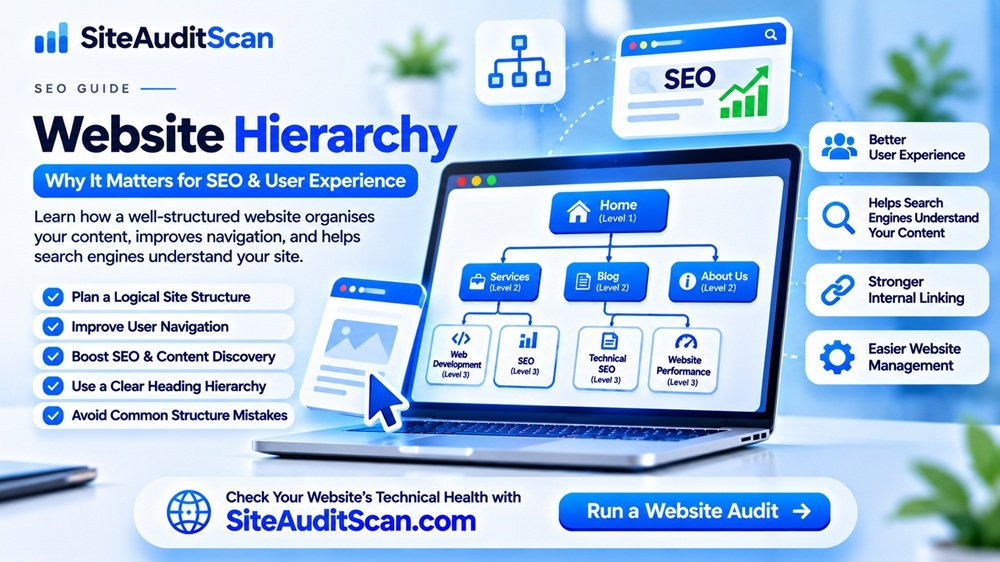
1. What Is Website Hierarchy?
Website hierarchy is the organised arrangement of pages and content within a website.
It establishes which pages are the main sections, which pages belong to those sections, and how visitors can move between them.
A properly structured website usually starts with the homepage, followed by important categories and their related pages.
For example, a company website may have the following structure:
- Home
- About Us
- Services
- Web Development
- Digital Marketing
- SEO
- Portfolio
- Blog
- Website Security
- Website Performance
- Technical SEO
- Contact
This structure makes it easier for visitors to navigate the website and understand how the information is connected.
Instead of presenting every page independently, website hierarchy groups related information together.
2. Why Is Website Hierarchy Important?
Website hierarchy is not just a design decision. It affects how people interact with your website and how search engines discover its content.
Here are some important benefits.
1. Improves User Experience
Visitors usually come to a website with a specific purpose.
They may want to learn about a service, compare products, read an article, or contact a business.
If the website has a clear hierarchy, visitors can find the information without unnecessary searching.
For example, someone visiting a digital marketing agency website should be able to navigate from the homepage to the services section and then to the SEO service page.
A logical structure reduces confusion and makes navigation easier.
2. Helps Search Engines Understand Website Content
Search engines use links and other signals to discover and understand website pages.
A well-organised website provides meaningful relationships between the homepage, categories, and individual content pages.
For example:
- Homepage links to Services.
- Services links to SEO Services.
- SEO Services links to relevant case studies and articles.
This creates a connected structure that helps search engines discover important content and understand its context.
3. Improves Internal Linking
Internal links connect one page of your website to another page on the same domain.
Website hierarchy makes it easier to identify which pages should link to one another.
For example, a blog article about website speed can link to a related article about Core Web Vitals and your website performance audit service.
This helps visitors explore related content and gives search engines additional ways to discover pages.
4. Makes Website Navigation Easier
Navigation menus, breadcrumbs, category pages, and footer links help visitors understand the structure of a website.
A good hierarchy ensures that these elements are organised consistently.
Visitors should not need to open multiple unrelated pages just to find a basic service or important piece of information.
5. Makes Website Maintenance Easier
A properly organised website is easier to manage as it grows.
When new services, products, blog articles, or categories are added, they can be placed in the correct sections.
Without a clear hierarchy, websites may develop duplicate categories, disconnected pages, and confusing navigation.
6. Supports Website Growth
A website that starts with five pages may eventually grow to hundreds of pages.
Planning the hierarchy early makes it easier to add new content without completely redesigning the website structure.
This is particularly important for blogs, e-commerce websites, educational platforms, and business websites with multiple services.
3. Understanding the Different Levels of Website Hierarchy
A typical website hierarchy can be divided into several levels.
Level 1: Homepage
The homepage is usually the main entry point of a website.
It should introduce the business, explain its primary purpose, and direct visitors to important sections.
It should provide links to the most important pages rather than attempting to display every available page.
Level 2: Main Category Pages
These pages organise the website into major sections.
Examples include:
- Services
- Products
- About
- Blog
- Resources
- Contact
Main category pages should clearly explain their purpose and provide links to relevant subpages.
Level 3: Subcategory Pages
Subcategories divide broad sections into more specific topics.
For example:
Services:
- Web Development
- SEO
- Branding
- Digital Marketing
This makes it easier for visitors to identify the exact service they are looking for.
Level 4: Individual Content Pages
These are the specific pages that provide detailed information.
Examples include:
- WordPress Development Services
- Technical SEO Services
- Website Security Audit
- Website Performance Optimization
Each page should have a clear purpose and a logical connection to its parent category.
4. Website Hierarchy Examples for Different Types of Websites
Website hierarchy depends on the type of website you are building.
Here are some practical examples.
Business Website Hierarchy
A typical company website may follow this structure:
Home
│
├── About Us
│
├── Services
│   ├── Web Development
│   ├── SEO
│   ├── Branding
│   └── Digital Marketing
│
├── Portfolio
│   ├── Website Projects
│   └── Branding Projects
│
├── Blog
│   ├── SEO
│   ├── Website Development
│   └── Website Security
│
└── Contact
This arrangement helps visitors understand the company’s services and explore related information.
E-commerce Website Hierarchy
An online store needs a structure that helps users discover products.
Home
│
├── Electronics
│   ├── Mobiles
│   ├── Laptops
│   └── Accessories
│
├── Fashion
│   ├── Men's Clothing
│   └── Women's Clothing
│
├── Offers
│
└── Contact
Individual product pages should be connected to the appropriate categories.
Educational Website Hierarchy
An educational platform may organise its courses by subject.
Home
│
├── Courses
│   ├── Engineering
│   │   ├── Civil Engineering
│   │   └── Mechanical Engineering
│   │
│   ├── Management
│   └── Computer Science
│
├── Student Reviews
├── Resources
└── Contact
This structure helps students locate relevant courses without navigating unrelated sections.
5. How Website Hierarchy Affects SEO
Website hierarchy plays an important role in technical SEO because it influences how content is connected and discovered.
Here are some ways it can support SEO.
Better Content Organisation
When related pages are grouped under meaningful categories, visitors and search engines can better understand the website’s subject areas.
For example, a website about SEO may organise articles into:
- Technical SEO
- On-Page SEO
- Off-Page SEO
- Local SEO
- AI Search
This creates a more organised content library.
Improved Internal Link Distribution
Internal links help search engines discover pages and understand their relationships.
Important pages should receive relevant internal links from suitable pages.
For example, a website audit service page may receive links from educational articles explaining website performance, security, and technical SEO.
Do not add links randomly. They should be relevant and useful to readers.
Clearer URL Structure
A logical hierarchy can also be reflected in website URLs.
For example:
example.com/services/seo/
example.com/blog/technical-seo/
example.com/blog/website-security/
Descriptive URLs help users understand what a page is about.
However, URLs do not need to reproduce every level of your navigation hierarchy. Keep them readable and avoid unnecessary depth.
Better Page Discovery
Pages that are linked through navigation, categories, and relevant content are generally easier for search engines to discover than isolated pages.
A well-designed hierarchy helps prevent important content from becoming difficult to find.
6. The Importance of Heading Hierarchy: H1, H2, and H3
Website hierarchy is not limited to menus and URLs. Individual page content also needs a clear heading structure.
HTML heading tags organise information within a page.
The most commonly used heading elements are H1 through H6.
H1 – Main Page Heading
The H1 generally represents the primary topic of the page.
Example:
<h1>Website Security Best Practices</h1>H2 – Main Content Sections
H2 headings divide the page into major sections.
Examples:
- Why Website Security Matters
- Common Website Security Issues
- How to Protect Your Website
H3 – Subsections
H3 headings provide more detail under an H2 section.
For example:
H2: Common Website Security Issues
H3: Weak Passwords
H3: Outdated Plugins
H3: Malware Infections
H4, H5, and H6 – Further Subsections
These headings can be used when the content needs additional levels of organisation.
Example of a logical heading structure:
<h1>Website Performance Optimization Guide</h1>

<h2>Why Website Speed Matters</h2>

<h2>Common Website Performance Issues</h2>

<h3>Large Images</h3>

<h3>Unoptimized JavaScript</h3>

<h2>How to Improve Website Speed</h2>

<h3>Enable Caching</h3>

<h3>Optimize Images</h3>
Avoid choosing heading tags simply because they provide a particular font size. Use CSS to control appearance and HTML headings to represent content structure.
A page does not need to contain every heading level. The structure should follow the actual content.
7. What Is the Difference Between Website Hierarchy and Website Navigation?
These terms are related, but they are not the same.
| Website Hierarchy | Website Navigation |
|---|---|
| Organises pages and content | Helps visitors move between pages |
| Defines relationships between pages | Provides menus, links, and navigation controls |
| Represents the overall structure | Represents how users access that structure |
| Includes categories and subcategories | Includes menus, breadcrumbs, and footer links |
For example, your website may have a Services section with several subpages.
That is part of the website hierarchy.
The menu that allows visitors to open the Services section is part of website navigation.
Both should work together.
8. What Are Breadcrumbs and Why Are They Important?
Breadcrumbs are navigation links that show visitors where they are within a website.
For example:
Home → Blog → Technical SEO → Website Hierarchy
They help users understand the relationship between the current page and its parent sections.
Breadcrumbs are particularly useful for:
- Large websites.
- E-commerce platforms.
- Educational websites.
- Blogs with multiple categories.
- Websites with deep content structures.
They can also help search engines understand page relationships when implemented appropriately.
For eligible pages, Google may display breadcrumb information in search results, although display is not guaranteed.
9. Common Website Hierarchy Mistakes to Avoid
Even well-designed websites can have structural problems.
Here are some common mistakes.
Mistake 1: Too Many Main Menu Items
A menu containing too many unrelated links can overwhelm visitors.
Group related pages into meaningful categories and keep the primary navigation focused.
Mistake 2: Important Pages Are Difficult to Find
Important service pages, product pages, or resources should not be hidden behind unnecessary navigation levels.
Make sure visitors can reach important content through clear links.
Mistake 3: Poorly Organised Blog Categories
Creating too many categories with only one or two unrelated articles can make a blog difficult to maintain.
Organise articles around meaningful subjects and use categories consistently.
Mistake 4: Duplicate or Confusing Pages
Similar pages with overlapping purposes can confuse visitors and make content management difficult.
Review your website and consolidate pages when appropriate.
Mistake 5: Incorrect Heading Structure
Using H1, H2, and H3 elements based only on their visual appearance can create a confusing document structure.
Use headings according to the logical organisation of your content.
Mistake 6: Orphan Pages
An orphan page is a page that has no internal links pointing to it from other pages on your website.
Such pages can be difficult for visitors and search engines to discover.
Add relevant internal links and include important pages in appropriate navigation or category structures.
Mistake 7: Ignoring Mobile Navigation
A website may have an excellent desktop menu but a confusing mobile navigation system.
Test your website on smaller screens and make sure visitors can easily access important pages.
10. How to Create an SEO-Friendly Website Hierarchy
If you are planning a new website or improving an existing one, follow these steps.
Step 1: Identify Your Website’s Main Purpose
Understand what your website offers and what visitors are looking for.
Step 2: List All Important Pages
Prepare a list of your homepage, services, products, categories, blog articles, and other important pages.
Step 3: Group Related Content
Place pages with similar subjects under meaningful parent categories.
Step 4: Create a Logical Navigation Structure
Design menus that make important pages easy to access.
Step 5: Use Descriptive URLs
Create short, readable URLs that explain the purpose of each page.
Step 6: Organise Page Headings
Use a logical H1, H2, and H3 structure for each page.
Step 7: Add Relevant Internal Links
Connect related pages naturally to help visitors discover more information.
Step 8: Implement Breadcrumbs Where Useful
Breadcrumbs can help visitors understand where they are within larger websites.
Step 9: Create and Maintain an XML Sitemap
Use an XML sitemap to list the important URLs you want search engines to discover.
Step 10: Review the Structure Regularly
As your website grows, review categories, navigation, links, and page relationships to keep the structure manageable.
11. How SiteAuditScan Can Help You Review Your Website
A well-structured website is an important part of maintaining good technical SEO.
However, website owners may not always know whether their website has technical problems, broken links, performance issues, or other areas that require attention.
With SiteAuditScan.com – Website Audit Tool, you can explore the technical and website health checks currently available on the platform.
You can use the available findings as a starting point to:
- Review your website’s technical health.
- Identify available SEO-related checks.
- Investigate potential website issues.
- Prioritise maintenance improvements.
- Recheck your website after making changes.
For a complete website hierarchy review, also manually inspect your navigation, URL structure, internal links, and page headings. Do not assume that an automated audit checks every aspect of website architecture.
Ready to review your website?
Visit SiteAuditScan.com and explore the available website audit checks