
Imagine publishing an important service page, a detailed blog post, or a product page on your website. You expect visitors to discover it through Google or your website navigation. However, weeks later, the page receives almost no traffic.
The page is published, loads correctly, and even has useful information. So why is nobody finding it?
One possible reason is that the page has become an orphan page.
Orphan pages are a commonly overlooked website structure problem. They can make important content difficult for visitors to discover and can create challenges for search engine crawlers trying to understand your website.
Whether you manage a business website, WordPress blog, ecommerce store, or large web application, understanding orphan pages is an important part of maintaining a healthy website.
In this guide, we will explain what orphan pages are, why they matter for SEO, how to identify them, and what you can do to fix them.
If you are looking to identify potential technical issues on your website, you can also explore the available website audit checks at SiteAuditScan.
What Are Orphan Pages?
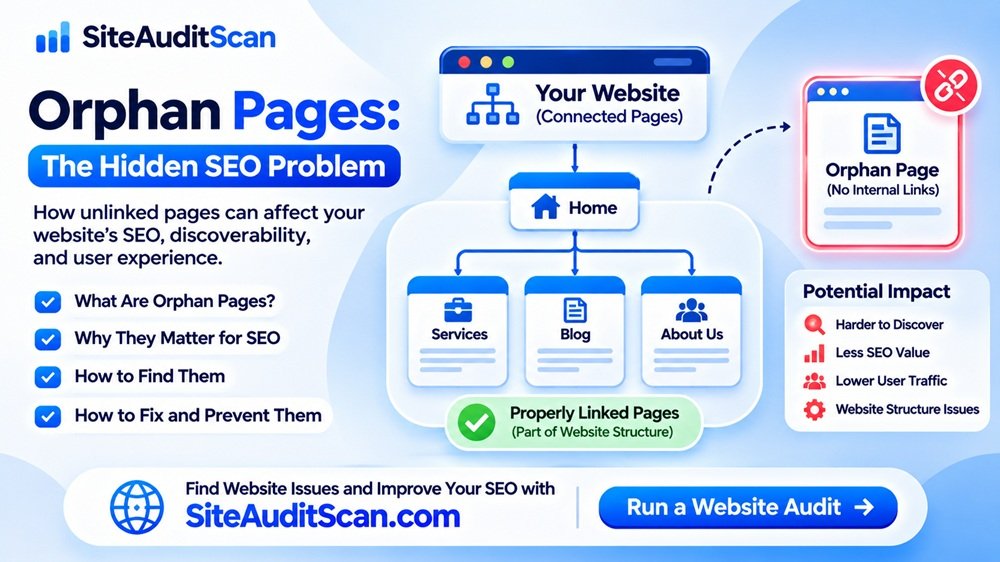
An orphan page is a webpage that has no internal links pointing to it from other pages on the same website.
In simple terms, the page exists, but visitors cannot easily reach it by clicking through the website’s normal internal links.
For example, consider a website with these pages:
- Homepage
- About Us
- Services
- Blog
- Contact Us
Now imagine that you publish a new page called “Website Maintenance Services”.
If none of the existing pages link to this new page, it may become an orphan page.
The URL might still work when someone enters it directly into their browser. It might even be included in an XML sitemap or receive links from external websites. However, without internal links, visitors and crawlers have fewer ways to discover it through the website itself.
Important: A page appearing in an XML sitemap does not mean it has a proper internal linking structure. A sitemap and internal links serve different purposes.
Why Do Orphan Pages Matter for SEO?
Internal links help search engines discover pages and understand how different sections of a website are connected.
When a page has no internal links pointing to it, search engines may have fewer paths to discover that content through normal website crawling.
This does not automatically mean Google will never index the page. Search engines can discover URLs through XML sitemaps, external links, and other sources.
However, having important pages disconnected from your website’s internal linking structure can create several SEO and usability problems.
Let’s look at the main issues.
1. Search Engines May Have Difficulty Discovering Important Pages
Search engine crawlers typically discover website content by following links from one URL to another.
When you create a new page and fail to link to it from any existing page, crawlers may not discover it as easily through normal navigation.
For example:
- You publish a new blog post.
- You submit its URL through your XML sitemap.
- You do not link to it from your blog page, related articles, or category page.
- Visitors browsing your website cannot easily find it.
The page may still be discovered through the sitemap, but it remains disconnected from the website’s internal structure.
For websites with hundreds or thousands of URLs, this can become a bigger problem.
2. Important Pages May Receive Less Internal Link Value
Internal links help communicate the relationship and importance of pages within a website.
For example, imagine your website has a main SEO services page and several supporting articles about keyword research, technical SEO, and website audits.
If these articles link naturally to your main SEO services page, they help establish a meaningful relationship between the content.
However, if an important page has no internal links pointing to it, it misses those opportunities to receive internal link signals.
This does not mean that every orphan page will rank poorly. Search rankings depend on many factors, including content relevance, competition, quality, and external signals.
Nevertheless, important pages should not remain disconnected from your website’s structure without a good reason.
3. Visitors May Not Find Valuable Content
SEO is not only about search engine rankings. It is also about helping visitors find the information they need.
Imagine someone visiting your website to learn about your services.
They browse your homepage, open the services section, and read a few articles. However, an important service page is not linked anywhere in the navigation or related content.
Even if that page contains useful information, most visitors may never discover it.
This can lead to:
- Missed opportunities to generate enquiries.
- Reduced discovery of important services.
- Poor navigation experiences.
- Lower engagement with useful content.
- Difficulty moving visitors towards relevant pages.
A well-organised website should allow visitors to discover important content naturally.
4. New Content May Take Longer to Become Discoverable
Publishing content regularly is a good practice, but creating new pages without updating internal links can leave content disconnected.
For example, a company publishes five new blog articles every month. However, it never updates its blog category pages or adds related article links.
Over time, the website may contain many useful articles that are difficult to discover through its own navigation.
When publishing a new article, make sure it is connected to relevant existing content.
You can add links from:
- Relevant older blog posts.
- Blog category pages.
- Related articles sections.
- Relevant service pages.
- Resource or guide pages.
This creates a stronger content network and gives visitors more opportunities to explore your website.
5. Website Maintenance Becomes More Difficult
Orphan pages are not always created intentionally.
They can appear after website redesigns, URL changes, content updates, or changes to navigation menus.
For example, consider a website redesign where the developer removes an old category page. Several articles that were previously linked from that category may lose their internal links.
Those articles might still exist, but they are now disconnected from the website’s main structure.
This is why orphan page checks should be part of regular website maintenance, especially after major redesigns and content migrations.
Common Reasons Why Orphan Pages Are Created
Understanding how orphan pages happen can help prevent them in the future.
Here are some common situations.
1. Website Redesign
During a redesign, developers often change navigation menus, page layouts, URL structures, and content categories.
If old internal links are not updated, some pages may become disconnected.
2. Deleted Navigation Links
A page might previously have been linked from the main menu, footer, or sidebar. When that link is removed without adding another relevant internal link, the page can become orphaned.
3. Publishing Blog Posts Without Internal Links
Some website owners focus entirely on publishing new articles without linking them to existing content.
Over time, the website can accumulate disconnected blog posts.
4. Incorrect URL Changes
Changing a URL without updating internal links can create broken links and leave the new URL disconnected from the rest of the website.
For example:
Old URL: /blog/website-speed-tips/
New URL: /guides/website-speed-optimisation/
If the website’s internal links still point to the old URL, visitors and crawlers may encounter a broken page or a redirect instead of a direct link to the new page.
5. Removing Categories or Parent Pages
Some websites organise content through category pages.
When a category is deleted or its structure is changed, the articles previously connected to it may lose their main internal discovery path.
6. Landing Pages Created for Advertising Campaigns
Marketing teams sometimes create landing pages for paid campaigns without adding them to the main website navigation.
These pages may intentionally remain outside the regular navigation. However, it is important to decide whether they should be discoverable through internal links or remain separate for a specific campaign purpose.
Not every page without internal links is necessarily a problem. Some landing pages, temporary pages, and private campaign resources may be intentionally isolated.
How to Find Orphan Pages on Your Website
Finding orphan pages requires comparing the URLs available on your website with the URLs discovered through internal links.
Here are some practical approaches.
Method 1: Use a Website Crawling Tool
A website crawler can explore your website by following internal links.
It can help identify pages that are linked from other pages, along with broken links, redirect chains, and other technical issues.
However, a crawler starting only from your homepage may not discover pages that have no incoming internal links.
For a more complete orphan-page investigation, compare the crawl results with other URL sources, such as:
- XML sitemap URLs.
- Google Search Console data.
- Analytics landing page URLs.
- CMS or database page lists.
- Known URL lists from previous website crawls.
Pages that appear in these sources but are missing from the internal crawl may be potential orphan pages.
Method 2: Check Your XML Sitemap
Your XML sitemap is a useful source of URLs that you want search engines to discover.
Open your sitemap and review the listed URLs.
For example:
https://example.com/sitemap.xml
You can compare the sitemap URLs with your website’s internal crawl results.
If a URL appears in the sitemap but has no internal links pointing to it, investigate whether it is an orphan page.
Remember that sitemap inclusion alone does not prove that a page is orphaned. You need to check its incoming internal links.
Method 3: Use Google Search Console
Google Search Console can help you understand how Google has discovered and processed your website’s pages.
You can use it to:
- Open Google Search Console.
- Select your website property.
- Navigate to the Pages indexing report.
- Review indexed and non-indexed URLs.
- Inspect important URLs using URL Inspection.
- Check whether Google has discovered or crawled the pages.
Google Search Console does not provide a complete orphan-page report. However, it can help identify pages that are not performing as expected or that need further investigation.
Method 4: Compare Your CMS Pages With Crawled URLs
If you use WordPress, Laravel, or another content management system, you can export the list of published pages and posts.
Compare this list with the URLs discovered through your internal website crawl.
For example:
| Page URL | Published in CMS | Found in internal crawl |
|---|---|---|
| /services/seo/ | Yes | Yes |
| /blog/technical-seo/ | Yes | Yes |
| /blog/old-seo-guide/ | Yes | No |
| /services/maintenance/ | Yes | No |
The last two pages should be investigated to determine why they are not being discovered through internal links.
This approach is particularly useful for websites containing a large number of published pages.
How to Fix Orphan Pages
Once you identify potential orphan pages, the next step is deciding what to do with them.
Do not simply add links to every page. First, understand whether the page is valuable, outdated, duplicated, or intentionally isolated.
1. Add Relevant Internal Links
If the page contains useful and relevant information, connect it to other related pages.
For example, if you have a blog post about website security, you can link to it from:
- Your website security service page.
- Related website security articles.
- A technical resources page.
- A relevant blog category.
Make sure the link is useful to visitors and fits naturally into the content.
2. Add the Page to a Relevant Category
If the page belongs to a blog category or service section, make sure it is accessible through that section.
For example:
Home → Blog → Technical SEO → Orphan Pages
This gives visitors a clear way to discover the content.
3. Update Your Navigation Where Necessary
Important service pages, product categories, and business information should be accessible through suitable navigation links.
However, avoid adding every single blog post to your main navigation. Use category pages, resource pages, and contextual links to keep the menu organised.
4. Update Related Articles
One of the easiest ways to improve internal linking is by reviewing older content.
If you have published a new article, look for existing articles that discuss related topics.
Add a relevant link to the new article where it genuinely helps the reader.
For example, an article about website crawling could link to your guide about orphan pages.
5. Redirect Pages That Have Been Permanently Replaced
Sometimes an orphan page is outdated or has been replaced by a newer page.
In that case, consider setting up a relevant permanent redirect, such as a 301 redirect, from the old URL to the most appropriate replacement.
Do not redirect every old page to the homepage. The destination should provide a relevant experience for visitors.
6. Remove Pages That Have No Long-Term Value
Some orphan pages may contain outdated information, duplicate content, or content that is no longer useful.
Depending on the situation, you may:
- Update the content.
- Merge it with a relevant page.
- Redirect it to a suitable replacement.
- Remove it when there is no useful replacement.
Make sure you understand whether the page has traffic, backlinks, or other value before removing it.
How to Prevent Orphan Pages in the Future
Fixing existing orphan pages is important, but preventing new ones is even better.
Follow these practices whenever you publish or update website content.
Create an internal linking plan: Before publishing a new page, identify at least one relevant existing page that can link to it.
Review category pages: Make sure your blog and service categories provide access to important content.
Check links after redesigns: Review internal links whenever you change website navigation, URL structures, or page layouts.
Update old content: When publishing a new article, review related older posts and add contextual links where appropriate.
Perform regular website crawls: Compare internal crawl results with sitemap and CMS URLs to identify pages that may have become disconnected.
Maintain a clear website structure: Organise your pages into meaningful sections so visitors and search engines can understand how your content is related.
Orphan Pages vs Broken Links: What Is the Difference?
These two issues are related to website navigation, but they are not the same.
| Orphan Pages | Broken Links |
|---|---|
| Pages have no incoming internal links. | Links point to unavailable or incorrect destinations. |
| The page may still load correctly. | The destination may return an error or an unexpected response. |
| Visitors may struggle to discover the page. | Visitors may encounter an error when clicking a link. |
| Fix by adding relevant links or managing the page appropriately. | Fix by updating the link, restoring the destination, or redirecting appropriately. |
For example, a page that loads correctly when entered directly into a browser but has no internal links may be an orphan page.
A link pointing to a page that returns a 404 error is a broken link.
Both issues should be considered during a technical SEO audit.
How SiteAuditScan Can Help With Website Auditing
Identifying website issues becomes easier when you follow a consistent auditing process.
SiteAuditScan is a website auditing platform where website owners, developers, and SEO professionals can explore available audit checks and investigate potential website problems.
When reviewing your website’s technical SEO, pay attention to areas such as:
- Internal linking structure.
- Broken links and inaccessible pages.
- Sitemap configuration.
- Page accessibility.
- Website performance.
- Technical SEO issues.
For a complete orphan-page investigation, compare the results of your available website checks with your XML sitemap, CMS page list, and Google Search Console data. A single website crawl may not identify every orphan page because disconnected URLs may not be reachable from the homepage.
Regular website audits can help you identify problems earlier and maintain a more organised website.
Visit SiteAuditScan.com to explore the available website audit checks.
Frequently Asked Questions (FAQs)
1. What is an orphan page in SEO?
An orphan page is a webpage that has no internal links pointing to it from other pages on the same website. It may still be accessible through its direct URL, sitemap, or external links.
2. Do orphan pages affect Google rankings?
Orphan pages can create discoverability and internal linking problems. However, being an orphan page does not automatically cause a ranking penalty. Its impact depends on the page, its content, how search engines discover it, and other SEO factors.
3. Can Google index orphan pages?
Yes. Google can discover orphan pages through XML sitemaps, external backlinks, and other sources. Internal links are an important discovery method, but they are not the only one.
4. How can I identify orphan pages?
Compare the URLs discovered through an internal website crawl with URLs from your XML sitemap, CMS, Google Search Console, and other known URL sources. Investigate URLs that have no incoming internal links.
5. Are all orphan pages bad for SEO?
No. Some pages, such as campaign landing pages or temporary pages, may be intentionally excluded from normal navigation. However, important pages that should attract organic traffic should generally be connected to relevant website content.
6. Should I delete orphan pages?
Not necessarily. First check whether the page contains useful content, receives traffic, or has backlinks. You may be able to improve it by adding relevant internal links. Delete or redirect it only when there is a valid reason.
7. Can an XML sitemap fix orphan pages?
An XML sitemap can help search engines discover URLs, but it does not create internal links or improve website navigation. You should address the internal linking problem separately.
8. How often should I check for orphan pages?
Check your website periodically and after major changes such as redesigns, URL migrations, category restructuring, and large content updates. The ideal frequency depends on how often your website changes.
9. What is the difference between an orphan page and a dead page?
An orphan page is a page with no incoming internal links, but it may still work normally. A dead page is generally unavailable or no longer functioning. A page returning a 404 error is one example of an unavailable page.
10. Do orphan pages waste crawl budget?
They can contribute to inefficient crawling when large numbers of unnecessary or disconnected URLs exist. However, crawl budget is primarily a concern for larger websites with substantial URL inventories. For most smaller websites, improving discoverability and internal navigation is the more immediate concern.
Conclusion
Orphan pages are easy to overlook because they can exist on a website without showing any obvious technical errors. A page may load correctly, contain valuable information, and even appear in a sitemap while remaining disconnected from the website’s internal linking structure.
The best approach is to regularly compare your published URLs with your internally linked pages, identify important disconnected content, and connect it to relevant sections of your website.
Remember, a good website is not just about publishing more pages. It is also about making sure visitors and search engines can discover and understand the content you have already created.
Start reviewing your website’s structure today and explore the available website audit checks at SiteAuditScan to help maintain a healthier, more organised website.